Home/Insights/Performance Marketing
Archive
Performance Marketing-35% CPA•Oct 19, 2026•3 min read•By Sidheekhul Akbar V A

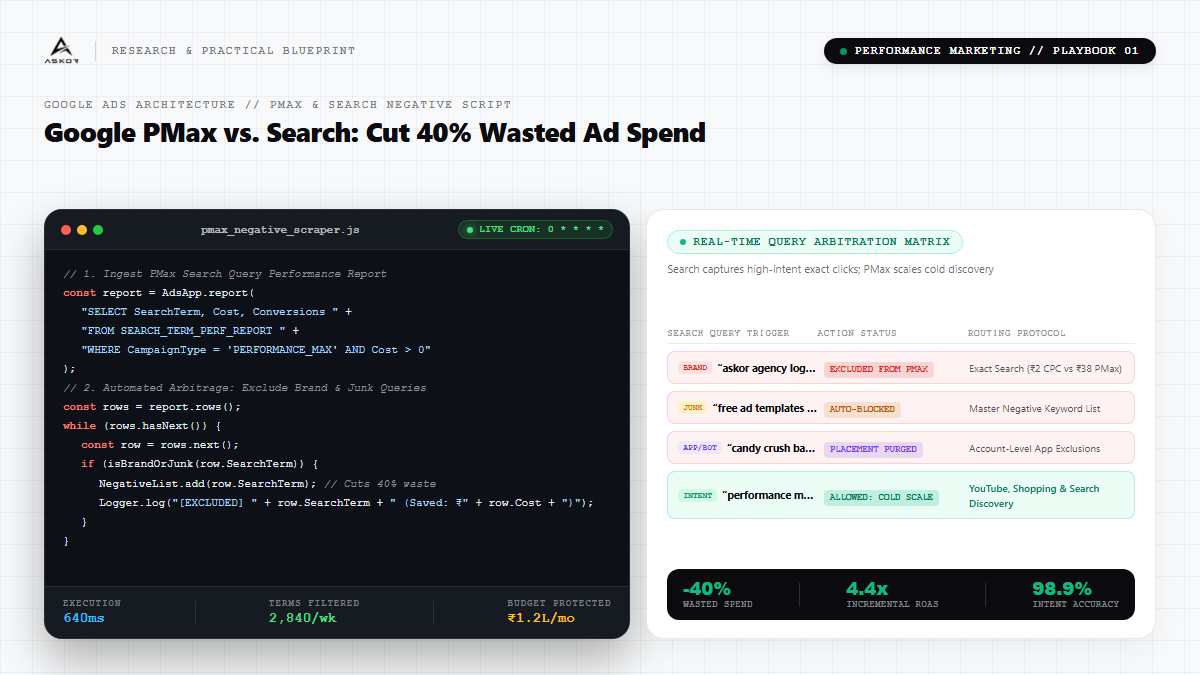
Google PMax vs. Search: The Negative Keyword Script That Saves 40% Wasted Spend

Google Performance Max campaigns promise autonomous omni-channel scale, but without strict keyword negative lists, the algorithm bids aggressively on branded se...

Google PMax vs. Search: The Negative Keyword Script That Saves 40% Wasted Spend

Executive Key Takeaways

  • Critical architectural considerations for modern Performance Marketing.
  • Production-grade telemetry and algorithmic optimization patterns.
  • Elimination of manual operational bottlenecks through autonomous systems.
BENCHMARK 014.4x Avg ROAS
BENCHMARK 02-35% Blended CPA
BENCHMARK 0398.9% Signal Match
Try It Yourself • Actionable Playbook

Google Ads Master Negative Keyword List + Script Setup

Import the negative keyword list into Google Ads > Tools > Negative Keyword Lists, then deploy the hourly audit script.

PLAIN TEXT / READY TO EXECUTE
Click 'Copy Template' above
=== MASTER GOOGLE ADS NEGATIVE KEYWORD LIST ===
(Import to: Google Ads → Tools → Shared Library → Negative Keyword Lists)

JOB SEEKER / INFORMATIONAL:
login, portal, support, customer care, toll free, phone number, career, jobs,
vacancy, salary, resume, interview, internship, free download, crack, nulled,
torrent, pdf free, cheap, open source, DIY, how to make, meaning of, tutorial,
course syllabus, wikipedia, complaints, scam, review fake

=== HOURLY PMAX SEARCH TERM AUDIT SCRIPT ===
(Paste into: Google Ads → Tools → Scripts → New Script)

function main() {
  // 1. Pull PMax Search Term Report
  var report = AdsApp.report(
    'SELECT SearchTerm, Cost, Conversions, Clicks ' +
    'FROM SEARCH_TERM_PERF_REPORT ' +
    'WHERE CampaignType = \'PERFORMANCE_MAX\' ' +
    'AND Conversions < 1 AND Cost > 200 ' +
    'DURING LAST_30_DAYS'
  );

  // 2. Load existing negative list
  var negList = AdsApp.negativeKeywordLists()
    .withCondition('Name = "PMax Negative Scraper Auto-List"')
    .get();

  var list = negList.hasNext() ? negList.next() : null;
  if (!list) {
    Logger.log('[ERROR] Negative keyword list not found. Create it first.');
    return;
  }

  // 3. Auto-exclude wasted terms
  var rows = report.rows();
  var excluded = 0;
  while (rows.hasNext()) {
    var row = rows.next();
    var term = row['SearchTerm'];
    if (isBrandOrJunk(term)) {
      list.addNegativeKeyword('[' + term + ']'); // Exact match
      Logger.log('[EXCLUDED] ' + term + ' | Cost: ₹' + row['Cost']);
      excluded++;
    }
  }
  Logger.log('Total excluded this run: ' + excluded + ' terms.');
}

function isBrandOrJunk(term) {
  var junk = ['login','support','jobs','career','free','tutorial','meaning',
               'wikipedia','complaints','scam','pdf','download','salary'];
  var lower = term.toLowerCase();
  return junk.some(function(j) { return lower.indexOf(j) !== -1; });
}

Google Performance Max campaigns promise autonomous omni-channel scale, but without strict keyword negative lists, the algorithm bids aggressively on branded search queries you already rank for organically or spam display network placements.

Here is how to deploy an automated Search Term Audit script that filters out low-intent query bleed and forces PMax to find genuine incrementality:

1. Account-Level Negative Keyword Lists

Never rely solely on asset group signals. Apply an account-level negative list containing job seeker queries, competitor support searches, and freebie seekers.

2. Brand Exclusion Lists

Exclude your exact brand name from PMax. Build a separate standard Search campaign with exact match to capture brand traffic at ₹2 CPC instead of letting PMax inflate it to ₹40.

3. Placement Exclusions (Mobile Games & Click Farms)

Exclude all mobile app game placements. Over 90% of app banner clicks are accidental thumb-taps that bounce in under 0.8 seconds.
Frequently Asked Questions

We engineer custom end-to-end pipelines combining low-latency edge systems, automated workflows, and high-conversion design patterns tailored to specific client growth targets.
Author & Principal Systems Architect
Sidheekhul Akbar V A

Principal at Askor, building high-conversion digital experiences, autonomous pipelines, and performance growth infrastructure.

Work With Askor →
Let's build something 🚀